
Lifers, as They Happen
Someone wrote to us comparing Bird Journal with other software they’d used. Most of those programs, they said, put up a small “life bird” pop-up when you record a species for the first time. They weren’t seeing that on the Mac version.
They were right. Bird Journal has always worked out your lifers and year firsts, but only after you’d saved the entry: on the entry itself, and in the Firsts report. At the moment you actually recorded the bird, the app didn’t notice.
It does now.
Marked the moment you record it
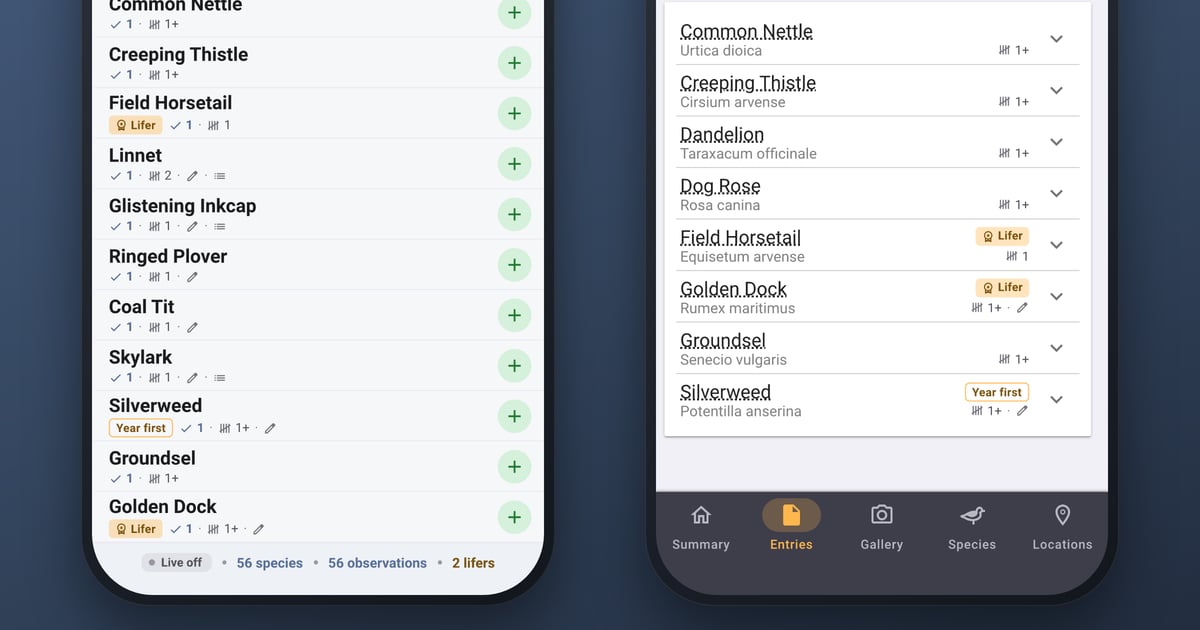
Record a species you’ve never recorded before and its row says Lifer. If it’s new for the year, it says Year first. The row lights up amber and fades back in under a second, just long enough to catch your eye, and the bar along the bottom keeps count: 56 species · 56 observations · 2 lifers.
That’s the recording screen on the left at the top of this post: a morning at Rutland Water with two lifers and a year first, all of them wild flowers. It works the same way wherever you record, on a phone or on a computer.
Why not a pop-up
A pop-up is the obvious answer, and we drew one. We turned it down for two reasons.
It breaks on your best day. Your first morning in Peru might bring a hundred and twenty lifers. The very first entry in a new journal is nothing but lifers. Anything that interrupts you once per lifer turns the best day you’ll have into the most irritating one. A badge and a brief highlight on the row scale to any number: on a big day you just watch the list fill up with amber, and none of it gets in the way of the next species.
An unexpected lifer is usually a mistake. If a common garden bird comes up as a lifer, you probably picked American Robin instead of Robin, which is exactly the slip that type-ahead search invites. The highlight lands on the row with the name on it, which is the thing you need to check and the place you’d fix it. A pop-up somewhere else on the screen would celebrate the error.
So the celebration is small, and it happens on the row itself.
Easy to find afterwards
Once you’ve saved, your firsts stay easy to find.
Start with your entries list. Any entry with lifers now says so at the end of its row, with the number of lifers underneath. An entry with year firsts but no lifers shows those instead. You can see at a glance which days brought something new.
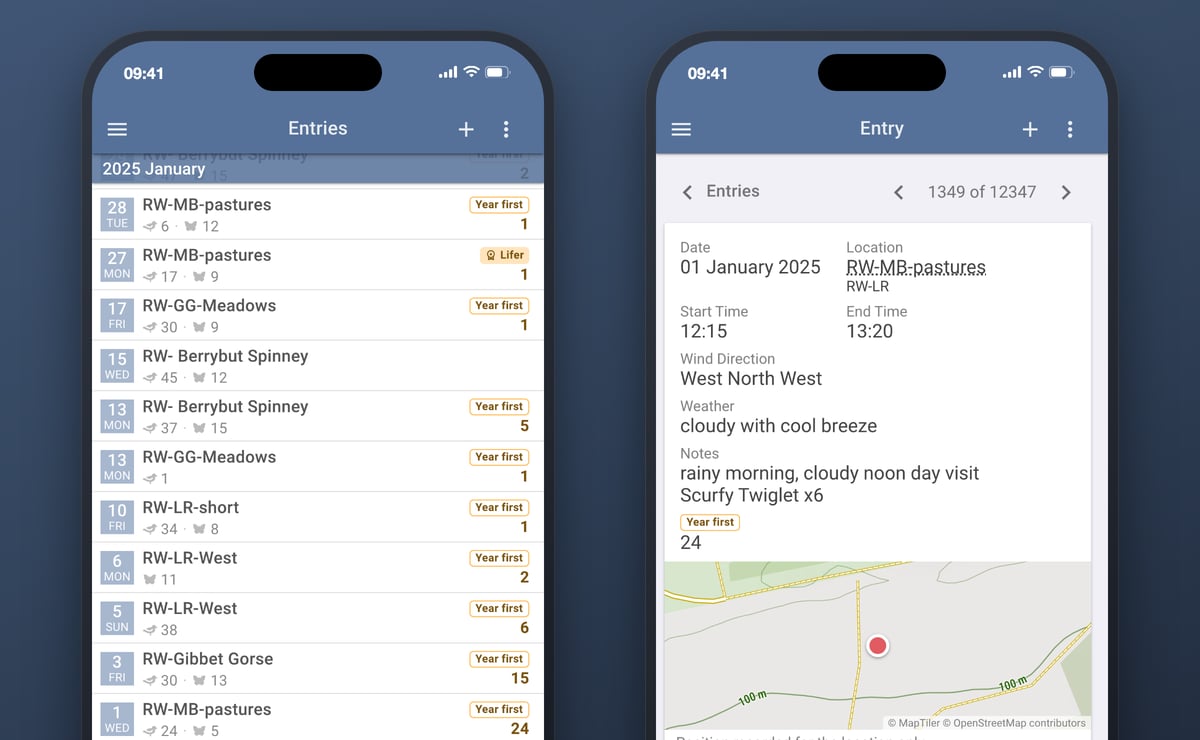
That’s January at Rutland Water above. A new year list means the first outings are full of year firsts: 24 on New Year’s Day, 15 two days later, and a lifer on the 27th.
Tap an entry and its card counts them in the same way: a Year first badge with 24 beneath it for New Year’s Day, on the right above. An entry with lifers shows a Lifer badge and its count beside it.
Further down, each species that was a first carries its badge beside its name. On a phone, where an entry’s species are collapsed to one row each, you can see them without opening a single row. That’s the right-hand phone at the top of this post. Any photos, notes or multiple observations under a species show as small marks on the same row, and step aside when you open it, because the detail underneath repeats them.
Firsts are counted per wildlife category. A moth you’ve never recorded is a moth lifer, however many birds you’ve seen, which is why the lifers at the top of this post are wild flowers from a morning with forty-seven species of bird in it.
The badge itself has been redrawn. The old one was white text on orange, which was hard to read in good light and close to impossible in sunshine. The new one is dark text on a pale amber, and a lifer also carries a small award symbol while a year first is an outline, so you can tell them apart without relying on colour. If you use a screen reader, it announces the lifer as it’s recorded, and waits until it has finished reading the current species name.
Whether you see lifers, year firsts or both is still up to you. There’s a switch for each in Settings, both on by default, and they now control all of this. With lifers switched off and year firsts on, a lifer shows as a year first, which is what it also is.
Firsts per Year
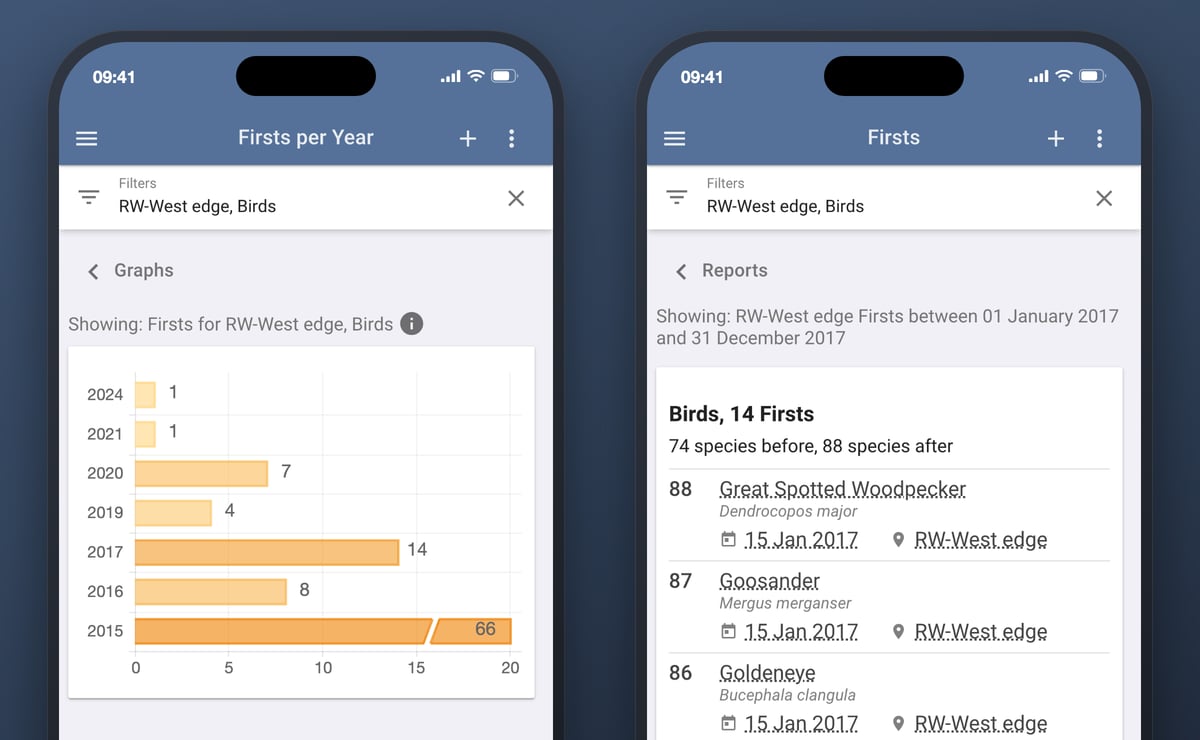
There’s also a new graph under Graphs: Firsts per Year. It shows how many species were new to you in each year of your journal. With no filter, those are your lifers, year by year.
Add a filter and it answers a different question. Filter to a location and each bar counts the species that were new to that place, so it shows how your patch list grew. Filter to a checklist or a family and it counts firsts within that.
Two details are worth knowing:
- The first year is cut short. In your first year of records everything is new, so that bar can be many times the length of any other. Drawn to scale, every later year would shrink to a sliver. When the first year dwarfs the rest, its bar is broken near the end and still labelled with its true count, so the other years stay readable. That’s one corner of Rutland Water above: 66 species in the first year, then eight, fourteen, and a handful each year after that.
- Tap a bar to see the species. Each bar opens the Firsts report for that year, with the same filter, listing every first with its date and location. From there you can widen or move the date range, whether that’s a trip, a season, or a birding year that starts in September.
This one has been waiting a while. The idea of a “Year Firsts Count” graph was posted in July 2016, and Edward King asked the next day whether it had to be tied to calendar years. The bars are calendar years, so they line up with the Year Species Count graph beside it. Any other date range is one tap away in the report. The name changed on the way, because Year first already means something in the app: the badge above.
Firsts per Year is part of Bird Journal Premium, alongside the other graphs. The badges, the highlight and the counts on your entries are free for everyone.
Two smaller things
- The desktop New Entry list says what you recorded. Each row used to show just a count. It now shows everything recorded for that observation (count, time, position, photos, notes) with the same marks the phones use, and the panel keeps a running total of species and observations. On a checklist, each row shows one name, the one your checklist options ask for.
- Opening a species row near the bottom of an entry now scrolls it into view as it opens, so you’re not left scrolling up to read it.
Getting it
All of this is live now on Bird Journal Web, Mac, Windows, iPhone and iPad. Update your app and record something new. The Android update is with Google for review, so it’ll follow in the next few days as an ordinary update. There’s nothing for you to do.
As ever, please tell us how you get on, especially the first time a genuine lifer lights up while you’re out in the field. There are feedback options built into the app under the Help menu, and the support site is always open.
This one started with a single message about the Mac version. If something in Bird Journal isn’t doing what you’d expect, tell us. That’s very often how it gets fixed.