Dark Mode
If you check your notes at dusk, write up an evening’s moth trap at night, or just keep your phone dark all the time, a bright white Bird Journal has been the odd one out.
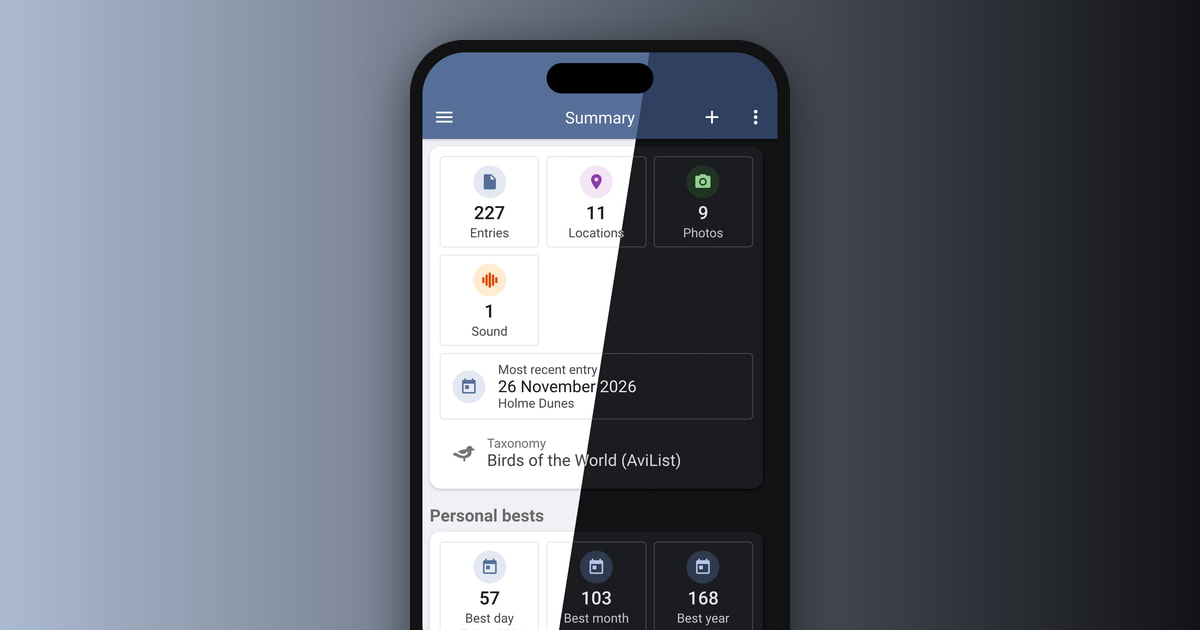
As of today, Bird Journal can be dark.
Choosing it
Open Settings, and at the foot of the General tab you’ll find a new section, Appearance, with one choice, Theme:
- Match device follows your phone or computer: dark when it’s dark, light when it’s light. If your device switches at sunset, Bird Journal switches with it, even while it’s open.
- Light is Bird Journal as you know it.
- Dark keeps it dark, whatever your device is set to.
The app changes as soon as you choose, so you can see how each looks. Save keeps your choice, and Cancel puts it back how it was.
Each change is one gentle fade from the old look to the new.
Nothing changes until you choose
On every device you’re already signed in on, Bird Journal looks exactly the same after you update: light, as it was yesterday, even if your phone is set to dark. We didn’t want anyone opening the app one morning to find it changed. A note in What’s New says that dark mode has arrived and where to find it, and then it’s up to you.
On a device where Bird Journal is new, a new phone or a fresh install, it follows the device’s own setting, so on a dark phone it turns dark as soon as you’ve signed in.
One device at a time
Your choice is kept on the device you make it on, under Chosen for this device only. So you can have your phone dark and your desktop light, if that’s how you like them. Choose Match device on each, and each follows its own setting.
What changes, and what doesn’t
Every screen goes dark: the Summary, your entries, lists, graphs, settings and the screen you record on, along with the menus, dialogs and pictures. Around the app, the rest follows: the launch screen on iPhone, iPad and Android 13 or later, and the title bar on Mac and Windows, so there’s no flash of white as Bird Journal opens.
A few things stay as they are, on purpose:
- Maps keep their usual light map, with your pins on top, as maps do in most apps.
- Photos stay as you took them.
- Reports go dark on screen, but print light, so your printouts look the same as ever.
Getting it
Dark mode is in the latest version of Bird Journal:
- Mac 5.28.11 or later
- Windows 5.22.12 or later
- Android 5.67.12 or later
- Bird Journal Web is always up to date
It’s coming to iPhone and iPad with the next update there.
Tell us how it looks
We’ve been through every screen in dark, but if anything looks wrong, hard to read or still too bright, we’d like to know. There are feedback options built into the app under the Help menu, and the support site is always open.